#1
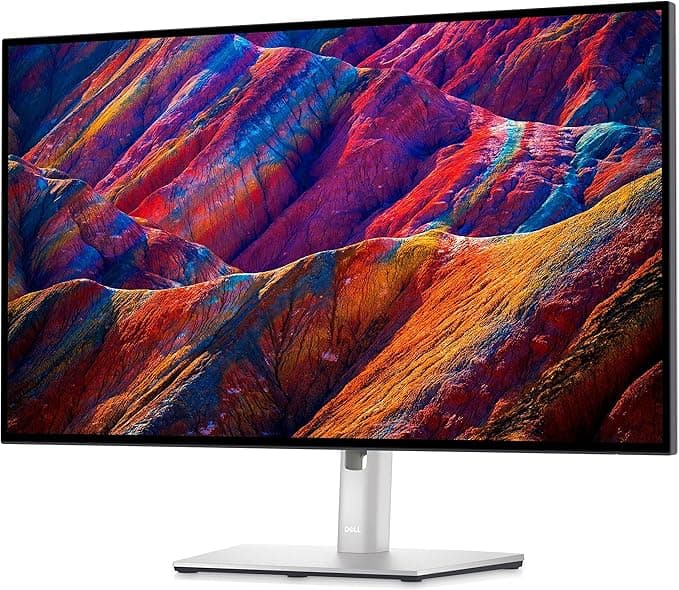
Dell UltraSharp U2723QE
4.7(1,020 reviews)
$421 - $453
- +IPS Black technology delivers superior contrast and color accuracy
- +90W USB-C charging supports high-power laptops
- +KVM switch allows seamless peripheral switching between computers
This comparison evaluates five standout monitors for 2026, each designed to excel in a specific role. The Dell UltraSharp U2723QE leads as the best overall 4K monitor for professionals, combining IPS Black technology with excellent contrast, USB-C power delivery, and workstation-focused features. Performance-focused gamers will gravitate toward the Asus ROG Swift OLED PG32UCDM, which pairs a QD-OLED panel with a 240Hz refresh rate for elite motion clarity and contrast. The MSI MPG 272URX earns its place as a premium mixed-use option, delivering OLED-level image quality and high refresh performance in a compact 4K form factor. Ultrawide enthusiasts will appreciate the Dell Alienware AW3425DW, which emphasizes immersion and smooth gameplay with a wide QD-OLED panel. Rounding out the list, the Arzopa Z1FC caters to users who need a portable, high-refresh display for travel or secondary use.
via Amazon.com
Check Price at AmazonAs an Amazon Associate, we may earn from qualifying purchases at no extra cost to you.
The Dell UltraSharp U2723QE defines the benchmark for professional 4K monitors, offering outstanding contrast, flexible connectivity, and features designed to enhance productivity.
The Dell UltraSharp U2723QE represents the pinnacle of professional 4K monitors with its innovative IPS Black panel technology that doubles the contrast ratio of standard IPS displays. This 27-inch monitor delivers 3840x2160 resolution with stunning clarity, making text and images appear razor-sharp. The USB-C port provides 90W power delivery, sufficient to charge most laptops while transmitting video and data through a single cable. Professionals will appreciate the built-in KVM switch that enables control of multiple computers with one keyboard and mouse setup. Color accuracy covers 100% sRGB and 98% DCI-P3 gamuts out of the box, though serious color work benefits from calibration. The design features thin bezels and comprehensive connectivity including DisplayPort, HDMI, and USB-A ports. While lacking speakers, the monitor excels in ergonomics with tilt, swivel, and pivot adjustments. The IPS Black technology particularly shines when viewing dark content, revealing shadow details that would be lost on conventional IPS panels. This monitor is ideal for photo editors, video professionals, and anyone needing precise color reproduction combined with productivity features.
via Amazon.com
Check Price at AmazonAs an Amazon Associate, we may earn from qualifying purchases at no extra cost to you.
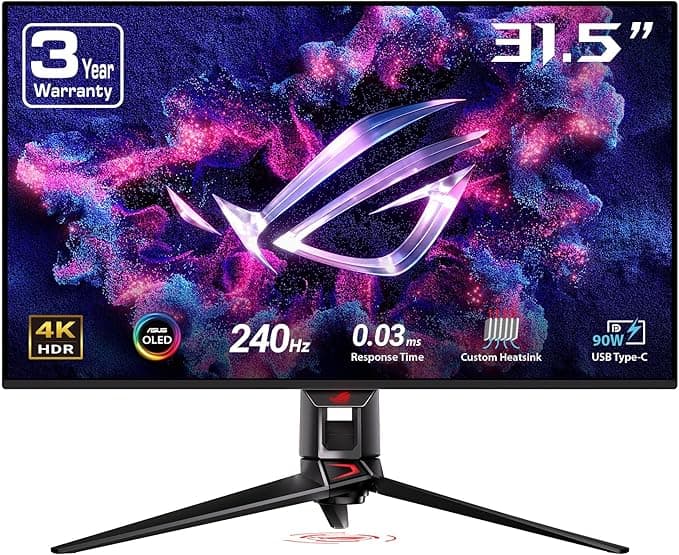
The Asus ROG Swift OLED PG32UCDM blends advanced QD-OLED technology with gaming-focused features to deliver an exceptional visual experience.
The Asus ROG Swift OLED PG32UCDM stands as one of the first 32-inch 4K OLED monitors to hit the market, offering exceptional picture quality for gaming and content consumption. The Quantum Dot OLED panel produces perfect blacks and vibrant colors with 99% DCI-P3 coverage, while the 240Hz refresh rate and near-instantaneous response time eliminate motion blur. This monitor supports both AMD FreeSync Premium Pro and Nvidia G-Sync Compatible for tear-free gaming. Connectivity includes HDMI 2.1, DisplayPort 1.4, and a 90W USB-C port that can charge laptops while displaying video. The built-in KVM switch allows easy switching between gaming PCs and work devices. HDR performance is outstanding with peak brightness reaching 1000 nits in small windows. The monitor includes multiple gaming-specific features like a framerate counter, on-screen crosshair, and shadow boost technology. While expensive, the PG32UCDM delivers an immersive gaming experience that surpasses traditional LCD monitors in contrast and motion clarity. The matte coating reduces reflections without significantly impacting image quality like some anti-glare treatments.

via Amazon.com
Check Price at AmazonAs an Amazon Associate, we may earn from qualifying purchases at no extra cost to you.
A high-end 27-inch 4K QD-OLED monitor that excels across gaming, productivity, and creative tasks, making it one of the most well-rounded displays in its class.
The MSI MPG 272URX stands out as one of the most versatile premium monitors currently available, striking an impressive balance between gaming performance, professional-grade image quality, and everyday usability. Built around a 27-inch 4K QD-OLED panel, it delivers the defining strengths of OLED technology—perfect blacks, near-infinite contrast, and instant pixel response—while maintaining the pixel density needed for crisp text and detailed creative work. This makes it equally comfortable handling color-sensitive tasks like photo and video editing as it is driving high-frame-rate gaming sessions.
For gaming, the monitor’s high refresh rate and exceptionally low response times provide fluid motion clarity with minimal ghosting, even in fast-paced competitive titles. Variable refresh rate support ensures tear-free performance across a wide range of GPUs, while the OLED panel’s per-pixel lighting gives HDR content a level of depth and realism that traditional LCDs struggle to match. Explosions, highlights, and dark scenes all retain fine detail without blooming or haloing.
In productivity and mixed-use scenarios, the 4K resolution at 27 inches offers a sharp workspace that comfortably supports multitasking, coding, and long reading sessions. Color reproduction is rich and accurate out of the box, and with proper calibration, it can serve as a reliable display for creative professionals. However, like all OLED-based monitors, users should be mindful of static elements and take advantage of built-in panel protection features during extended desktop use. While the price places it squarely in the enthusiast tier, the MSI MPG 272URX justifies its cost by delivering a rare, genuinely all-purpose experience without major compromises.

via Amazon.com
Check Price at AmazonAs an Amazon Associate, we may earn from qualifying purchases at no extra cost to you.
A premium 34-inch QD-OLED ultrawide monitor that prioritizes immersion and motion clarity, making it an exceptional choice for cinematic gaming and multitasking.
The Dell Alienware AW3425DW is a flagship ultrawide monitor designed with immersion as its primary goal, and it delivers on that promise with authority. Its 34-inch curved QD-OLED panel and 21:9 aspect ratio create a wide, enveloping field of view that transforms gaming into a more cinematic experience. Whether exploring open-world environments or racing at high speeds, the added horizontal space provides a tangible advantage in awareness and visual engagement.
Performance is a major strength of this display. The combination of a high refresh rate and OLED’s instantaneous pixel response results in exceptionally smooth motion with virtually no smearing or ghosting. Dark scenes retain depth and detail thanks to true blacks and precise per-pixel lighting, while HDR content benefits from vibrant highlights and strong contrast without the blooming artifacts common to LCD-based ultrawides. Variable refresh rate support further ensures a consistent, tear-free experience across modern graphics cards.
Beyond gaming, the ultrawide format also enhances productivity by allowing multiple applications to sit side by side without the need for a dual-monitor setup. However, its resolution prioritizes width over pixel density, which means text clarity is good but not as razor-sharp as smaller 4K panels. Additionally, some older games and software may require tweaks to fully support the 21:9 format. For users who value immersion, smooth performance, and OLED image quality above all else, the Alienware AW3425DW stands as one of the best ultrawide monitors in its class.

via Amazon.com
Check Price at AmazonAs an Amazon Associate, we may earn from qualifying purchases at no extra cost to you.
The Arzopa Z1FC provides desktop-level 144Hz gaming performance in a highly portable 15.6-inch design, making it ideal for mobile setups.
The Arzopa Z1FC redefines portable monitor capabilities by offering a 144Hz refresh rate in a slim 15.6-inch form factor. The 1920x1080 IPS panel provides good color accuracy and wide viewing angles while maintaining a lightweight 1.7-pound design. Gamers will appreciate the high refresh rate that enables smoother gameplay when paired with gaming laptops or devices like the Steam Deck. The monitor includes both USB-C and mini HDMI inputs, compatible with PCs, game consoles, and mobile devices. The included smart cover doubles as a stand with multiple viewing angles. While brightness peaks at 300 nits, the matte anti-glare coating helps maintain visibility in various lighting conditions. The Z1FC draws power through USB-C, eliminating the need for a separate power brick but requiring connection to a powered device. Color performance covers 100% sRGB, suitable for casual content creation. The monitor's thin bezels and 8mm thickness make it highly portable, though the lack of a built-in battery means it can't operate independently. For travelers and LAN party attendees who want high refresh rates without sacrificing portability, the Z1FC offers unique value in the portable monitor market.
Product-Review-Crew analyzed multiple data sources to compare five exceptional monitors for 2026. The Dell UltraSharp U2723QE earns the top recommendation for professionals who prioritize color accuracy and productivity. Its IPS Black panel offers noticeably deeper contrast than standard IPS displays, while 90W USB-C power delivery simplifies laptop docking and charging. An integrated KVM switch adds efficiency for multi-device workflows, although the stand’s limited height adjustment may require an aftermarket solution for some setups. For gamers chasing top-tier performance, the Asus ROG Swift OLED PG32UCDM stands out with its QD-OLED panel, infinite contrast, and ultra-smooth 240Hz refresh rate. Motion clarity is outstanding, and features like USB-C charging and KVM support expand its versatility, though the premium price and long-term OLED care considerations remain factors.
Ranked third, the MSI MPG 272URX is the best choice for users seeking a true mixed-use monitor without major compromises. Its 27-inch 4K QD-OLED panel delivers exceptional sharpness, perfect blacks, and vibrant color, making it equally suitable for gaming, creative work, and daily productivity. High refresh performance ensures smooth gameplay, while the compact size keeps desk setups manageable. As with all OLED displays, brightness in full-screen SDR and burn-in precautions are worth noting, but overall it offers one of the most balanced experiences available in 2026. In fourth place, the Dell Alienware AW3425DW appeals to ultrawide fans who value immersion above all else. The 34-inch 21:9 QD-OLED panel creates a cinematic gaming experience with excellent contrast and fluid motion, while also enhancing multitasking for productivity. Its lower pixel density compared to 4K panels and occasional software compatibility issues with ultrawide formats are trade-offs inherent to the category. Finally, the Arzopa Z1FC remains the best portable option, offering a 144Hz refresh rate in a lightweight 15.6-inch design. USB-C and mini HDMI connectivity make it easy to use as a secondary display on the go, though the small screen size and lack of a built-in battery limit its role as a primary monitor. Overall, professionals should choose the Dell UltraSharp U2723QE, competitive gamers will benefit most from the Asus ROG Swift OLED PG32UCDM, mixed-use users will find excellent value in the MSI MPG 272URX, ultrawide enthusiasts should look to the Alienware AW3425DW, and travelers will appreciate the portability of the Arzopa Z1FC.
James has reviewed consumer electronics and gadgets for over 6 years. He specializes in audio equipment, cameras, and smart home devices.
Last updated:
Based on our analysis of thousands of verified user reviews, Dell UltraSharp U2723QE is the top-rated Monitors of in 2026, earning our Best Overall award for its combination of performance, value, and reliability.

Comments (7)
Returned the Asus because my desk is shallow and the stand footprint was too deep. A monitor arm fixed it, but that added eighty bucks to the cost.
Does the Arzopa Z1FC actually run at 144Hz over USB-C or is that only over HDMI? My laptop only has USB-C.
It supports high refresh over USB-C if your port has DisplayPort alt mode and enough power. My 2024 ThinkPad runs it at 144Hz no problem.
I almost bought the MSI MPG 272URX but had to settle for a cheaper VA panel this year. Prices on 4K OLED are still rough if you need a second monitor too.
Picked up the Alienware AW3425DW last month. The ultrawide curve took a few days to get used to, but now my old flat panel feels cramped.
Leave a Comment